
Tutorial: Automate Azure Flexible PostgreSQL Backup and Ship to Storage Account
#azure#postgresql#backup#azure-devops#blob-storage#devops#automation
This tutorial describes how to automate backup of Azure Flexible Server (PostgreSQL) databases across multiple regions and upload the backup files to an Azure Storage account. The solution uses an Azure DevOps pipeline that runs pg_dump per server and uploads compressed backups to Blob Storage.
Problem statement
You have Azure Flexible PostgreSQL instances in multiple regions (e.g. 10 regions). You need to:
- Back up each database on a schedule (e.g. daily, with a full backup monthly).
- Ship the backup files to a central Azure Storage account (Blob) for retention and restore.
- Run the process in a repeatable, automated way (e.g. Azure DevOps pipeline).
Challenges:
- Each region has one or more PostgreSQL servers; connection details (host, user, password) differ per server.
- You want a single pipeline that backs up all servers without duplicating logic.
- Backup files should be organized in storage (e.g. by year/month/day) and named so you can identify server and backup type (daily vs full).
Solution overview
The approach:
- One Azure DevOps pipeline with a stage that backs up databases and uploads to Blob.
- One job per server (using
${{ each }}over a list of server names), so backups run in parallel or sequentially depending on the agent. - Per-server configuration: Each server has a YAML config file (e.g.
{server}-*.yml) that holds the JDBC URL and credentials; the pipeline discovers it and extracts connection info. - Backup logic: Use
pg_dump(plain format), pipe togzip, then upload the resulting.sql.gzto Azure Blob with a path like{year}/{month}/{day}/.... - Backup types: “Daily” backup every run; “full” backup on the 1st of the month (you can change this rule).
    +------------------+     +------------------+     +-------------------+
    | Azure DevOps     |     | Azure Flexible   |     | Azure Blob        |
    | Pipeline         |     | PostgreSQL       |     | Storage           |
    |                  |     | (per region)     |     | (central)         |
    |  Backup_Databases|     |                  |     |                   |
    |  ├─ job server_1 |---->| Server 1         |     | container/        |
    |  ├─ job server_2 |---->| Server 2         |---->| 2025/03/15/       |
    |  ├─ ...          |---->| ...              |     | daily-postgres-   |
    |  └─ job server_N |---->| Server N         |     | server1-....sql.gz|
    +------------------+     +------------------+     +-------------------+
Prerequisites
| Requirement | Notes |
|---|---|
| Azure DevOps | Project, repo, and a pipeline (YAML). |
| Azure subscription | Same or linked subscription where PostgreSQL and Storage live. |
| Service connection | Azure Resource Manager service connection (azureSubscription) with access to the subscription and to the resource group that contains the Storage account. |
| Storage account | Account and a container for backup blobs. Pipeline needs permission to get storage keys and upload blobs. |
| PostgreSQL access | Pipeline agent must reach *.postgres.database.azure.com (outbound HTTPS/5432 as per Azure Flexible rules). If the agent runs in Azure (e.g. Microsoft-hosted or self-hosted in VNet), ensure firewall/NSG allows it. |
| Tools on agent | az CLI, pg_dump (PostgreSQL client), gzip, and yq (for parsing YAML). Install yq in a prior step if not present on the agent image. |
Pipeline structure
- Parameters: List of logical server names (e.g.
Servers_Name) that you use to find config files and to name jobs. - Stage: One stage (e.g.
Backup_Databases) that contains all backup jobs. - Jobs: One job per server via
${{ each server in parameters.Servers_Name }}. Each job runs the same steps but with a differentservervalue. - Steps: One main step (e.g.
AzureCLI@2) that runs a Bash script to:- Find the config file for that server.
- Read DB URL, username, password from the config.
- Determine backup type (daily vs full) and generate backup filename.
- Run
pg_dumpand gzip. - Get Storage account key and upload the file to Blob.
Variables (pipeline or variable group) used in the script:
$(azureSubscription)— Azure service connection name.$(resourceGroup)— Resource group of the Storage account.$(storageAccount)— Storage account name.$(containerName)— Blob container name.$(backupDir)— Local directory on the agent for temporary backup files (e.g.$(Pipeline.Workspace)/backups).
Configuration file per server
Each server has a YAML config file in the repo (or in the workspace) named so the script can find it, e.g. {server}-something.yml. The script uses yq to read Spring-style datasource properties:
spring.datasource.url— JDBC URL, e.g.jdbc:postgresql://myserver.postgres.database.azure.com:5432/postgres.spring.datasource.username— DB user.spring.datasource.password— DB password.
The script derives the PostgreSQL host from the URL (e.g. myserver from myserver.postgres.database.azure.com). The database name used for backup is postgres in the example; you can change it if you use a different database.
Backup types and naming
- Daily backup: Runs every time the pipeline runs; filename prefix
daily-.... - Full backup: Runs when the day of the month is
01; filename prefixfull-....
Filename pattern: {BACKUP_TYPE}-{dbname}-{server_name}-{YYYYMMDD}{HHMMSS}.sql.gz
Example: daily-postgres-myserver-20250315143022.sql.gz
Blob storage path
Backups are uploaded under a hierarchical path so you can list by year/month/day:
- Path pattern:
{year}/{month}/{day}/{filename}
Example:2025/03/15/daily-postgres-myserver-20250315143022.sql.gz
This makes it easy to apply retention (e.g. delete blobs older than 90 days) and to find backups by date.
Pipeline YAML (backup stage)
Below is the Backup_Databases stage and the inline script used for each server. You can place this in your main pipeline YAML or a template; ensure parameters and variables are defined.
Parameters (example):
parameters:
  - name: Servers_Name
    type: object
    default:
      - server-eastus
      - server-westus2
      # ... add all 10 (or N) server identifiers
Stage and job:
- stage: Backup_Databases
  displayName: "Backup Databases and Upload to Azure Blob Storage"
  jobs:
    - ${{ each server in parameters.Servers_Name }}:
        - job: backup_database_${{ server }}
          displayName: "Backup and Upload for ${{ server }}"
          steps:
            - task: AzureCLI@2
              displayName: "Database Backup and Upload for ${{ server }}"
              inputs:
                azureSubscription: $(azureSubscription)
                scriptType: bash
                scriptLocation: inlineScript
                inlineScript: |
                  #!/usr/bin/env bash
                  set -e
                  mkdir -p $(backupDir)
                  server_name="${{ server }}"

                  az account list -o table | grep "Production Subscription" && echo "✅ Correct subscription selected" || (echo "❌ Incorrect subscription, exiting"; exit 1)

                  echo "Starting backup for server: $server_name"
                  echo "-------------------------------------------"
                  echo "🔹 Processing server: $server_name"

                  # Locate configuration file
                  config_file=$(find . -type f -name "${server_name}-*.yml" | head -n 1)
                  if [ -z "$config_file" ]; then
                    echo "⚠️ Configuration file for $server_name not found, skipping."
                    exit 1
                  fi

                  echo "🗂 Using configuration file: $config_file"

                  # Extract info from YAML
                  db_url=$(yq '.spring.datasource.url' "$config_file")
                  password=$(yq '.spring.datasource.password' "$config_file")
                  username=$(yq '.spring.datasource.username' "$config_file")
                  dbname="postgres"

                  # Extract server name from JDBC URL (host before .postgres.database.azure.com)
                  pg_host=$(echo "$db_url" | sed -E 's#.*//([^\.]+)\.postgres\.database\.azure\.com.*#\1#')

                  echo "Server Name: $pg_host"
                  echo "Username: $username"
                  echo "Database: $dbname"

                  BACKUP_TYPE="daily"
                  CURRENT_DATE=$(date +%Y%m%d)
                  CURRENT_TIME=$(date +%H%M%S)

                  # Full backup on 1st day of month
                  if [ "$(date +%d)" = "01" ]; then
                    BACKUP_TYPE="full"
                  fi

                  backupname="${BACKUP_TYPE}-${dbname}-${pg_host}"
                  BACKUP_FILE="$(backupDir)/${backupname}-${CURRENT_DATE}${CURRENT_TIME}.sql.gz"

                  echo "🗄 Performing $BACKUP_TYPE backup..."

                  export PGPASSWORD="$password"
                  if ! pg_dump -h "${pg_host}.postgres.database.azure.com" \
                              -U "$username" \
                              -d "$dbname" \
                              --no-owner --no-privileges --format=p | gzip > "$BACKUP_FILE"; then
                    echo "❌ pg_dump failed for $server_name"
                    unset PGPASSWORD
                    exit 1
                  fi

                  echo "✅ Backup created at: $BACKUP_FILE"
                  ls -lna "$BACKUP_FILE"

                  echo "☁️ Uploading to Azure Blob Storage..."
                  ACCOUNT_KEY=$(az storage account keys list \
                    --resource-group $(resourceGroup) \
                    --account-name $(storageAccount) \
                    --query '[0].value' -o tsv)

                  DATE_FOLDER=$(date +'%d%m%Y')
                  CURRENT_YEAR=$(date +%Y)
                  CURRENT_MONTH=$(date +%m)
                  UPLOAD_FILE_PATH="${CURRENT_YEAR}/${CURRENT_MONTH}/${DATE_FOLDER}/$(basename "$BACKUP_FILE")"

                  if az storage blob upload \
                    --account-name $(storageAccount) \
                    --account-key "$ACCOUNT_KEY" \
                    --container-name $(containerName) \
                    --file "$BACKUP_FILE" \
                    --name "$UPLOAD_FILE_PATH" \
                    --overwrite true; then
                    echo "✅ Upload completed for $server_name"
                  else
                    echo "⚠️ Upload failed for $server_name"
                    exit 1
                  fi

                  unset PGPASSWORD
                  echo "🎉 Backup and upload completed for $server_name"
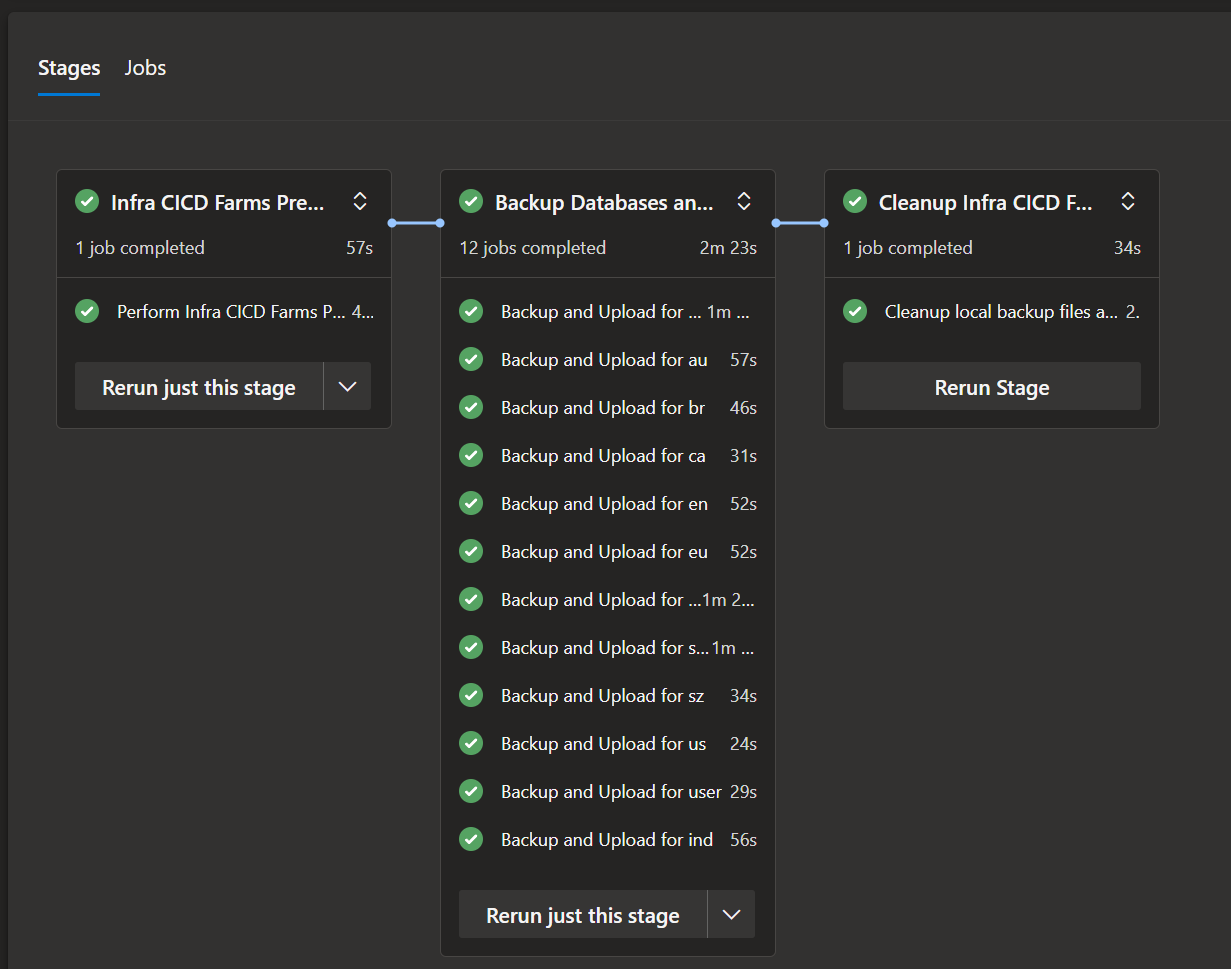
Example pipeline run: The backup stage runs one job per server (e.g. 12 jobs for 12 regions). A preceding stage handles infra; a cleanup stage runs after backups.
Script walkthrough
| Step | What it does |
|---|---|
| Subscription check | Ensures the Azure CLI is targeting the correct subscription (e.g. Production) before touching any resources. |
| Config discovery | find . -name "${server_name}-*.yml" locates the YAML file for this pipeline server identifier. |
| Extract credentials | yq reads spring.datasource.url, username, and password. The hostname is parsed from the JDBC URL with sed. |
| Backup type | If day is 01, use full; otherwise daily. |
| pg_dump | Connects to Azure Flexible PostgreSQL with SSL (default). --no-owner --no-privileges keeps the dump portable; --format=p is plain SQL. Output is piped to gzip. |
| Upload | Gets the storage account key, then uploads the file to Blob at {year}/{month}/{date}/{filename}. --overwrite true allows re-running the same day. |
Note: The script uses pg_host (from the JDBC URL) for the actual PostgreSQL host and for the backup filename. The parameter server_name is the pipeline’s logical name used to find the config file. If your config file naming matches the Azure server name, you can keep both in sync.
Running the pipeline
- Set variables (or use a variable group):
azureSubscription,resourceGroup,storageAccount,containerName,backupDir. - Ensure config files for each entry in
Servers_Nameexist in the repo (or are copied into the workspace before this stage). - Schedule the pipeline (e.g. nightly at 2 AM) via Azure DevOps scheduled trigger, or run it manually.
- Check logs per job to confirm
pg_dumpand blob upload succeeded for each server.
Optional improvements
- Retention: Add a step or a separate pipeline to delete blobs older than N days (e.g. with
az storage blob delete-batchor lifecycle rules on the storage account). - Fail the stage if any job fails: By default, one failed job fails the stage; you can use
dependsOnor matrix strategies if you need different behavior. - Restore: Document a restore procedure: download the desired
.sql.gzfrom Blob, unzip, thenpsql ... -f backup.sql(or use Azure’s point-in-time restore for the managed service and use file backups only for extra safety). - yq installation: If the agent doesn’t have
yq, add a step before the Azure CLI task to install it (e.g. download binary or use package manager).
Summary
| Item | Description |
|---|---|
| Problem | Backup Azure Flexible PostgreSQL in many regions and ship to a central Storage account. |
| Solution | One Azure DevOps stage with one job per server; each job runs a Bash script that reads per-server YAML config, runs pg_dump, gzips, and uploads to Blob. |
| Config | Per-server YAML with spring.datasource.url, username, password; host parsed from URL. |
| Naming | daily- or full- + postgres + server name + timestamp; path in Blob: year/month/day/filename. |
| Tools | Azure CLI, pg_dump, gzip, yq on the pipeline agent. |
This gives you a single, repeatable pipeline to back up all Azure Flexible PostgreSQL servers across regions and ship the backups to Azure Blob Storage.
Comments